
Behind a single Agent PIN, the bKash Agent app keeps a live e-money float balance, the day's cash-in and cash-out lines, B2B float transfers routed to a Distributor Sales Officer, and a searchable statement an agent can scroll back through. That is a small but dense ledger. It changes every time a customer walks up to the counter. For anyone running more than one outlet, or building accounting, lending, or treasury tooling on top of bKash's agent network, that per-transaction stream is the thing worth reaching — and it sits behind an authenticated session, not on a public page.
Data the app holds, and what you'd do with it
Each row below is a surface the app actually exposes to a logged-in agent, named the way the app names it where possible.
| Data domain | Where it originates in the app | Granularity | What an integrator does with it |
|---|---|---|---|
| Float / e-money balance | One-tap balance check on the home screen | Current value in BDT, point-in-time | Live float monitoring across outlets; low-float alerts before a counter runs dry |
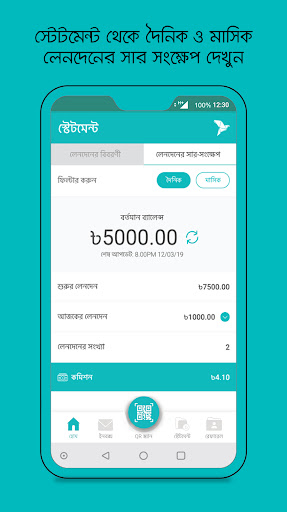
| Transaction statement | Statement view and the recent-transactions list on home | Per transaction: id, type, counterparty number, amount, fee, post-balance, timestamp | Daily reconciliation, bookkeeping export, audit trails |
| Cash-in records | Cash In flow (number picked from contacts, amount shortcuts) | Customer MSISDN + amount per deposit | Settlement tracking and customer-deposit attribution |
| B2B float transfers | B2B transfer screen with the DSO number auto-filled | DSO number, amount, timestamp | Automating float top-ups and matching them to distributor invoices |
| Commission / earnings | Per-transaction detail in the statement, where shown | Commission earned per qualifying transaction | Outlet profitability and agent payout reporting |
| Transaction notifications | Instant push notification on every transaction | Event-level alert per transaction | A near-real-time event bridge into a back office or webhook |
Authorized routes into the agent ledger
Three routes genuinely apply here. They differ in effort and in how well they survive an app update.
1 · Protocol analysis of the authenticated session
We instrument a consenting agent's session, watch how the app authenticates and how it requests the balance and statement, and rebuild those calls as a documented client. What is reachable: everything the agent sees in-app, because we are reading the same responses. Effort is moderate and front-loaded into the mapping. Durability is good for the read surfaces, which change slowly, and we account for front-end churn in maintenance. Setup is a consenting agent account or a sandbox, which we arrange with you during onboarding.
2 · User-consented session operation
For agents who want their own data extracted on a schedule, we operate the documented flow on their behalf with their explicit consent and credentials, held under the controls in the compliance section. This suits a super-agent or distributor consolidating many SIMs. Reachable scope matches route 1; the difference is who holds the session.
3 · Native statement capture as a fallback
Where a structured session is not yet available for a given outlet, the in-app Statement view and its search are themselves a source. We capture and parse that view into the same typed schema. It is the most fragile of the three and we treat it as a stopgap, not the foundation.
For bKash Agent specifically, route 1 is the one we would build on. The balance and statement are the highest-value, most stable surfaces, and they are loaded by the same requests every agent triggers dozens of times a day — so the work is well-defined and the result keeps working. Route 2 layers cleanly on top when an agent or distributor wants the pull run for them; route 3 only fills gaps.
What lands in your repo
The deliverable is the working integration for com.bkash.businessapp, not a report about one. Concretely:
- An OpenAPI / Swagger specification covering the agent surfaces you need — at minimum balance and the typed statement, with cash-in, B2B and commission fields modelled.
- A protocol and auth-flow write-up: the Agent PIN login, the SMS-verified device binding, the session token and its refresh window, and the Tap-and-Hold confirmation step on write transactions.
- Runnable source for the key endpoints in Python or Node.js — a client that logs in, pulls a date-ranged statement, and emits normalized records.
- A normalization layer that maps Bangla and English labels and Bangla numerals to one stable English schema, so the agent's language setting never reaches your data.
- Automated tests plus a replay test harness built from recorded responses, so the client can be re-checked against captured fixtures without hitting a live account.
- Interface documentation and a short compliance and data-retention note covering consent records and logging.
A statement pull, sketched
The shapes below are illustrative — endpoint paths and field names are recovered and confirmed against live responses during the build, not copied from any published document. They show the read path an integrator cares about: log in, then pull the typed statement the home screen already lists.
# Illustrative. Real paths and field names are confirmed during protocol analysis.

# 1) Session token from the Agent PIN login on the SMS-verified device.
POST /agent/v1/auth/login
  { "msisdn": "<agent number>", "pin": "<agent PIN>", "deviceId": "<bound device>" }
  -> 200 { "accessToken": "...", "expiresIn": 900, "agentId": "..." }

# 2) Read the statement the Statement view already renders.
GET /agent/v1/statement?from=2026-06-01&to=2026-06-25&limit=50
  Authorization: Bearer <accessToken>
  -> 200 {
    "balanceAfterLast": "...",
    "items": [
      { "trxId": "...", "type": "CASH_IN", "counterparty": "01XXXXXXXXX",
        "amount": "...", "fee": "...", "commission": "...",
        "balanceAfter": "...", "ts": "2026-06-25T10:14:32+06:00" },
      { "trxId": "...", "type": "B2B", "dso": "01XXXXXXXXX",
        "amount": "...", "balanceAfter": "...", "ts": "..." }
    ]
  }

# Error handling we wire in:
#   401  -> token expired; re-run the PIN login, retry once.
#   429  -> back off and respect the app's own request spacing.
#   Bangla labels/numerals in a field -> normalize before emitting.
Where this gets used
A few shapes we see for an agent-side integration:
- A super-agent or distributor pulling float balance and statement across dozens of outlet SIMs into one treasury dashboard, with low-float warnings.
- An accounting product that reconciles each agent's daily cash-in and cash-out against the physical till count and flags mismatches.
- A credit or scoring tool that uses an agent's transaction velocity and float pattern as a signal, run only with that agent's consent.
- A notification-to-webhook bridge so a back office records every transaction the moment it posts, rather than at end of day.
Bangladesh Bank, Binimoy, and the consent we work under
bKash is a mobile financial service supervised by Bangladesh Bank. The Mobile Financial Services Regulations 2022, which replaced the 2018 rules, restrict agents to cash-in, cash-out and other transactions the central bank approves, and put per-day and per-month ceilings on them — cash-in around Tk 30,000 a day and cash-out around Tk 25,000 a day per the 2022 regulations, with AML and CFT monitoring expected of the provider. Those limits shape what the ledger can contain, which is useful to model up front. At the rail level, Binimoy — the Interoperable Digital Transaction Platform launched in late 2022 as a joint Bangladesh Bank and ICT Division initiative — moves money between wallets and banks; it is interoperability plumbing, and it does not change the fact that the per-transaction detail you want lives in the agent's own statement.
Bangladesh's data-protection statute is still settling: the draft Personal Data Protection Act has moved through cabinet stages but is not yet an enforced law, so we do not lean on it as a present-tense rulebook. The dependable basis for this work is the agent's own authorization over their own account data. We operate authorized, documented or user-consented access only; sessions are logged, consent is recorded, data is minimized to the fields you actually need, and an NDA is in place where the engagement calls for one.
Engineering we build around
Three things about this specific app shape the build, and we handle each rather than handing it back as a requirement.
- Tap-and-Hold plus PIN on write transactions. The app deliberately gates confirmations behind a PIN entry and a press-and-hold gesture. We keep the integration read-only for balance and statement by default, and we model the hold timing precisely when an agent does authorize write automation, so a confirmation is never fired faster than the app itself allows.
- The balance auto-hides after a few seconds. That is a display privacy timer, not a data restriction. We read the value from the response rather than the rendered screen, so the timer is irrelevant to the pull — worth stating because it looks like a blocker and is not.
- Dual language and Bangla numerals. The agent can flip between Bangla and English at any time, so labels and some digits arrive in either script. We normalize both to one English schema and convert Bangla numerals, so a language change on the agent's phone never propagates into your data.
Access itself — a consenting agent account, or a sandbox where one is available — is arranged with you during onboarding and is part of the engagement, not a checklist you clear before we start.
Running an engagement
A read-only statement and balance client for com.bkash.businessapp is typically ready in one to two weeks once access is in place. You can buy the source outright from $300 — runnable code, the OpenAPI spec, tests and interface docs, paid only after delivery once you have looked it over and you are satisfied. Prefer not to host anything? Call our endpoints instead and pay per call, with nothing upfront. The same agent surfaces sit behind both. Tell us the app and what you need from its data, and we will point you at whichever fits — start a conversation at /contact.html.
Screens we worked from
Public Play Store screenshots of the agent app, used to map the visible surfaces. Select to enlarge.


The Bangladesh MFS field
bKash Agent sits inside a crowded mobile-financial-services market. A unified integration usually wants to speak to several of these neighbours, since merchants and agents rarely stay on one wallet. Named here for context, not ranked.
- Nagad — the Bangladesh Post Office-linked wallet; holds customer balances, send-money and merchant payment records.
- Rocket — Dutch-Bangla Bank's bank-anchored MFS; account balances, cash-in/out and bank-linked transfers.
- Upay — United Commercial Bank's wallet; wallet balances, P2P and bill-payment history.
- Trust Axiata Pay (tap) — a bank-and-telco joint wallet holding balances and transaction records.
- Islami Bank mCash — Islami Bank Bangladesh's MFS; Shariah-aligned wallet accounts and transfers.
- SureCash — payment platform widely used for disbursements and tuition; holds account and payment ledgers.
- OK Wallet — One Bank's mobile wallet, with balances and transaction history.
- Meghna Pay — a newer MFS entrant carrying wallet balances and transfer records.
How this was put together
The surfaces come from the app's own Play Store listing and bKash's agent pages; the regulatory framing from Bangladesh Bank's published MFS rules and contemporary reporting on Binimoy and the draft data-protection law. Checked June 2026. Primary sources:
- bKash Agent on Google Play (com.bkash.businessapp)
- bKash — Agent programme overview
- Bangladesh Bank — Mobile Financial Services Regulations, 2022 (PDF)
- Dhaka Tribune — government launch of Binimoy (IDTP)
Compiled by the OpenBanking Studio integration desk · June 2026.
Questions integrators ask
Can you separate cash-in, cash-out and B2B float in the statement feed?
Yes. Each statement line carries a transaction type, so cash-in to a customer, cash-out, and B2B transfers to a DSO come through as distinct records, each with the counterparty number, amount, fee, any commission shown, and the running balance after the transaction. We normalize those into one typed schema your back office can group on.
The balance hides itself a few seconds after it loads. Does that block the read?
No. The auto-hide is a client-side privacy timer on the home screen, not a limit on the data. The value arrives in the response the screen renders from, and we read it there, so the timer never affects an integration pull.
Which regulator governs this in Bangladesh, and does Binimoy change the route?
bKash operates under Bangladesh Bank's Mobile Financial Services Regulations 2022, which restrict agents to cash-in, cash-out and other approved transactions and set per-day and per-month limits. Binimoy, the central interoperable transaction platform launched in 2022, moves funds between wallets and banks at the rail level; it does not replace reading the agent's own ledger, which is where the per-transaction detail lives.
What happens to the field labels when an agent switches the app to Bangla?
The app runs in Bangla or English and the agent can switch at any time, so labels and some numerals come back in either script. We map both to a stable English schema and convert Bangla digits to Western numerals, so a language change on the agent's device does not break anything downstream.
How quickly can a read-only statement and balance client be ready?
For the statement and balance surfaces, one to two weeks once a consenting agent account or a sandbox is in place. Write automation that drives the Tap-and-Hold confirmation flow is scoped on its own, because it carries the agent's PIN and we keep it deliberately separate from the read path.
App profile — bKash Agent
bKash Agent is the agent-facing app of bKash Limited, the largest mobile financial service in Bangladesh. It is meant for active bKash Agents, who use it to run their counter: an SMS-verified onboarding and Agent PIN login, a one-tap float balance check that hides itself for privacy, recent transactions and a searchable statement, cash-in to customer numbers picked from contacts, B2B float transfers with the DSO number auto-filled, instant transaction notifications, and a Tap-and-Hold confirmation gate on transactions. The app works in Bangla or English. Agents are the cash distribution layer of the network, replenishing float through their distributors; the separate bKash Customer app is for end users. Package identifier com.bkash.businessapp, per the Play Store listing.