
Every balance, transfer and statement a Credit Union 1 member touches in the app passes through Online Access, the portal the credit union has run on Alkami's digital banking platform since 2014, per a Finextra report at the time. That portal is the integration surface. CU1 is an Alaska state-chartered, NCUA-insured credit union based in Anchorage, with around 100,000 members and roughly $1.5 billion in assets as of year-end 2022, per its Wikipedia entry. A single member login reaches checking and savings, loans, mobile deposits, scheduled payments and a back-catalog of statements. What follows is the data, the authorized way to reach it, and the deliverable.
The dependable way in is the member's own authorization to their Online Access session, since that reaches the live, per-account records they see in the app. We treat downloadable statements and an FDX-aligned aggregation feed as ways to widen history and durability around that core, not as substitutes for it. The sections below name each surface and the code we write against it.
What the data covers
These are the surfaces a CU1 login exposes, mapped to where they originate in the app and what an integrator does with each.
| Data domain | Where it shows up in the app | Granularity | What an integrator does with it |
|---|---|---|---|
| Account balances | Snapshot quick-balance and the account dashboard | Per share/checking account, near real time | Cash-position dashboards, balance checks before a debit |
| Transactions and spending | Transaction list under Online Access ("track your spending") | Per posted item, dated, with running balance | Ledger sync, bookkeeping, categorization |
| Transfers and scheduled payments | Move Money > Transfers > Scheduled | Per transfer plus recurring rules | Payment automation, cash-flow forecasting |
| Loan accounts, rates, payments | Loan payment screen and "View CU1 loan rates and terms" | Per loan: balance, rate, due date | Debt dashboards, payoff and refinance tooling |
| Mobile check deposits | Deposit checks (remote deposit capture) | Per deposit item with status | Deposit reconciliation, funds-availability tracking |
| Statements and tax docs | Success Tools > eDocuments | Monthly statement PDFs, year-end tax forms | Statement archival, document ingestion, history backfill |
| Alerts and card state | Customizable email/text/push alerts; debit and credit card controls | Event triggers; card lock status | Event-driven notifications, card-management features |
Authorized paths in
Three routes genuinely apply to CU1. Each is described by what it reaches, how durable it is, and what we set up to run it.
Member-consented Online Access integration
With the member's authorization, we analyze the traffic between the app and the Online Access backend and rebuild it as a clean interface: authenticate, carry the MFA and device step, then read balances, transactions, transfers and loan records. This reaches everything the member sees, which is why it is the path we recommend for CU1. Access is arranged with you and a consenting member during onboarding; the build runs against that session. Durability is good with one caveat we handle below: the Alkami front end changes on its own release cadence.
FDX-aligned aggregation
US institutions are converging on the Financial Data Exchange standard, the same shape Plaid Core Exchange implements. Where a CU1 FDX-aligned feed is reachable, we integrate against it for a more durable, standardized contract that survives front-end changes. We fold this in alongside the consented route as that ecosystem matures, rather than waiting on it.
Native export for history
Online Access lets a member download statements as PDFs and, on many screens, transaction history as a file. We use those exports to backfill older history quickly at the start of a project, then keep it current through the live session. Blunt but reliable for a one-time load.
Where teams plug in
Concrete shapes a CU1 integration takes, end to end:
- A budgeting app refreshes a member's CU1 balances and transactions each night and reconciles them against other Alaska accounts.
- An accounting tool pulls a small-business member's loan payment history and monthly statements straight from eDocuments.
- A lending flow verifies a member's balances and recurring deposit income, with consent, before a loan decision.
- A treasury dashboard watches the balance and direct-deposit alerts to trigger a sweep when funds land.
What lands at the end
The output is working code plus the documents to run and audit it, all tied to CU1's actual surfaces:
- An OpenAPI/Swagger spec covering the login, balance, transaction, transfer, loan and eDocuments endpoints as we model them.
- A protocol and auth-flow report: the login sequence, the MFA and device step, token or cookie handling, and session lifetime.
- Runnable source for the key calls in Python or Node.js, including the statement-PDF parser that turns eDocuments into fields.
- Automated tests against recorded responses so a CU1 front-end change is caught before it reaches your data.
- Interface documentation and data-retention guidance covering consent records and what to log.
A login-and-pull sketch
Illustrative shape of the consented flow. Exact paths and field names are confirmed during the build against a real CU1 session, not taken from any published constant.
# Illustrative — host, paths and field names verified during the build,
# not asserted here as public CU1 endpoints.
import requests

BASE = "https://onlineaccess.cu1.example"   # Online Access (Alkami) host

def login(member_id, secret, otp):
    s = requests.Session()
    # primary auth -> server issues an MFA challenge
    s.post(f"{BASE}/auth/login", json={"username": member_id, "password": secret})
    # device + one-time code the member completes during onboarding
    r = s.post(f"{BASE}/auth/mfa", json={"otp": otp})
    return s, r.json()["accessToken"]

def accounts(s, token):
    r = s.get(f"{BASE}/accounts",
              headers={"Authorization": f"Bearer {token}"})
    # -> [{ "id", "type": "share|loan", "nickname", "available", "balance" }]
    return r.json()["accounts"]

def transactions(s, token, account_id, since):
    r = s.get(f"{BASE}/accounts/{account_id}/transactions",
              headers={"Authorization": f"Bearer {token}"},
              params={"from": since})
    if r.status_code == 401:      # session aged out -> re-auth within TTL
        raise SessionExpired()
    return [
        {"date": t["postedDate"], "amount": t["amount"],
         "memo": t["description"], "running": t["runningBalance"]}
        for t in r.json()["items"]
    ]
Statements come through a separate eDocuments call that returns PDF references; the parser normalizes each into the same row shape so historical and live data line up. Throttling (HTTP 429) and the MFA re-challenge are handled in the session layer, not sprinkled through callers.
Consent and US data rights
CU1 sits under the NCUA and the Alaska Division of Banking and Securities, and member funds are NCUA-insured. For data access, the rule everyone watches is CFPB Section 1033: finalized in late 2024, then enjoined and reopened for reconsideration, with the compliance timeline that would have reached institutions of CU1's size put on hold. We do not build on §1033 today, because it is not in force. What we build on is the member's own authorization to reach their accounts, recorded with scope and an expiry, revocable by the member, and limited to the fields a given use actually needs. Where §1033 lands once reconsideration finishes is where the FDX-aligned route gets more durable; until then, consent carries the work. We keep access logs, hold a signed authorization, and sign an NDA where the engagement calls for one.
What we plan around on CU1
Two specifics shape how a CU1 build is engineered:
- Alkami release cadence. Online Access runs on Alkami's platform, which ships its own updates that can move portal markup and response shapes. We wire a re-validation step into maintenance that flags a changed login or payload before it silently breaks a running sync, so a platform release is a caught diff rather than an outage.
- MFA and device registration. Login carries a one-time code and a device-registration step. We design the auth flow to carry the member's MFA and keep the session alive within its token lifetime, and we arrange that step with the consenting member during onboarding rather than assuming a password alone gets in.
- Statements as PDFs, not rows. History in eDocuments is delivered as monthly PDF statements and tax forms. We account for parsing those into structured fields, since a year of statements is otherwise a folder of documents rather than queryable data.
Screens we mapped
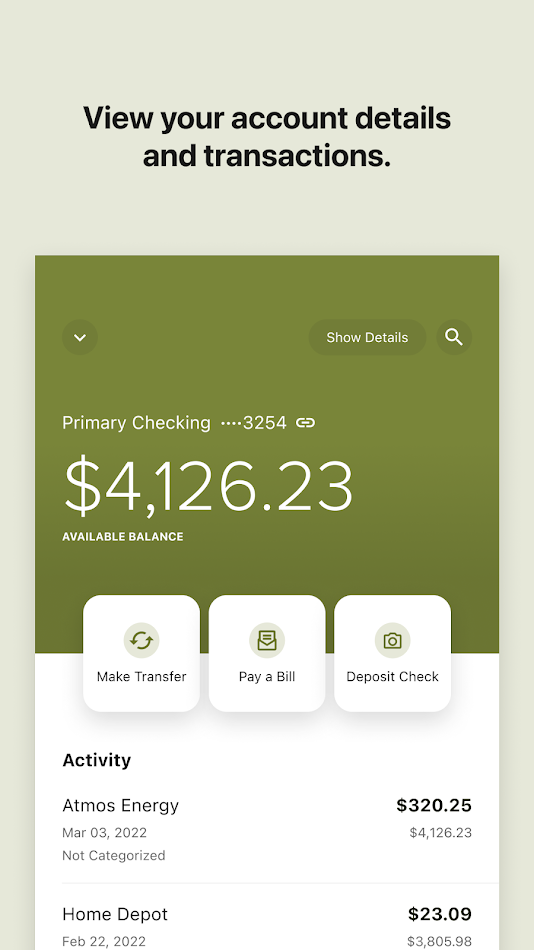
Store screenshots of the CU1 app we reviewed while mapping surfaces. Select one to enlarge.




Other Alaska institutions in the same picture
A member rarely banks in one place, so a unified integration usually reaches more than CU1. These same-category Alaska apps hold comparable account data and come up alongside it.
- Global Credit Union (formerly Alaska USA Federal Credit Union) holds balances, cards, transfers and bill pay for a large statewide membership.
- Matanuska Valley Federal Credit Union serves the Mat-Su Valley with checking, lending and the usual transaction history.
- Spirit of Alaska Federal Credit Union, based in Fairbanks, offers mobile deposit, transfers, alerts and card controls.
- True North Federal Credit Union covers Juneau and Southeast Alaska with member accounts and lending data.
- Tongass Federal Credit Union, out of Ketchikan, runs a banking app with mobile check deposit and account tools.
- Nuvision Credit Union absorbed Denali Alaskan and holds balances, statements and inter-institution transfers.
- Northrim Bank, an Alaska bank, exposes deposit and loan account data through its own mobile channel.
- Denali State Bank in Fairbanks holds checking, savings and loan records for Interior Alaska customers.
How this was put together
Surfaces were mapped from CU1's own digital-banking pages and the app's store listing, the Alkami platform adoption was confirmed against the 2014 announcement, and the data-rights status was checked against the CFPB's reconsideration notice in June 2026. Sources opened:
- CU1 mobile banking page
- Finextra: Credit Union 1 chooses Alkami ORB platform
- CFPB: Personal Financial Data Rights reconsideration
- Wikipedia: Credit Union 1 (Alaska)
Mapped by the OpenBanking Studio integration desk · June 2026.
Integrator questions
Where inside the CU1 app does the data actually live?
Everything a member sees runs through Online Access, the Alkami-built portal CU1 adopted in 2014. Balances come from the Snapshot view, movement from the transaction list and Move Money screens, statements and tax forms from Success Tools > eDocuments, and loan figures from the loan-payment and rate screens. We map each surface to a field rather than treating the app as one blob.
Does the CFPB open-banking rule cover Credit Union 1 right now?
Not in any enforceable way. The CFPB Section 1033 rule was finalized in late 2024, then enjoined and pulled back into reconsideration, with the compliance dates that would have applied to institutions this size frozen. So the basis we build on is the member own authorization to reach their accounts, not a regulatory mandate.
Can you reach old statements, or only the current balance?
Both. Live balances and recent transactions come straight from the Online Access session; older history comes from the eDocuments archive, where monthly statements and tax documents sit as PDFs. We parse those into structured fields so a year of statements becomes queryable data, not a folder of files.
Credit Union 1 runs on Alkami's platform - does that change the build?
It shapes it. The portal markup and endpoints shift when Alkami ships a platform release, so we build a re-validation step into maintenance that flags a changed login or response shape before it breaks a running sync. The member MFA and device-registration step is carried through the authenticated flow we set up during onboarding.
A CU1 build lands as runnable source for the Online Access login and the balance, transaction, transfer and statement calls, with an OpenAPI spec and tests beside it. Source-code delivery starts at $300, billed only after we hand it over and you have checked it works on your data. Prefer not to host it yourself? Call our endpoints instead and pay per call, with nothing upfront. Either way the cycle is one to two weeks. Tell us the app and what you need from its data on the contact page and we will scope it.
App profile: Credit Union 1 - Alaska
Credit Union 1 is an Alaska state-chartered, NCUA-insured credit union headquartered in Anchorage, with around 100,000 members and roughly $1.5 billion in assets as of year-end 2022, per its Wikipedia entry. The mobile app (package com.cu1.cu1 on Google Play; App Store id 532558157) gives registered members balance views and transfers, loan payments, mobile check deposit, loan applications and rate lookups, secure messaging, statements through eDocuments and customizable alerts. Use of the app requires Online Access registration at cu1.org. Names and figures here are drawn from the app's store listings, the credit union's site and its Wikipedia entry; this page is an independent integration write-up and is not affiliated with Credit Union 1.