
The institution behind this app is a small community bank in Miami-Dade — five branches in Aventura, Coconut Grove, Coral Gables, Palmetto Bay and South Miami, by the bank's own count — which means the build looks less like a megabank exercise and more like protocol work against a tightly-scoped digital banking front end. The headline app feature in its store copy is internal account aggregation: a customer's Grove accounts plus their external bank and credit-union accounts shown in one place. That detail is what changes the integration conversation. It tells you Grove's app is sitting downstream of an aggregator stack already, which both eases and complicates how an integrator should route consent.
The brief on this page is concrete. We work from one consenting account holder's authorization against the live app and portal, capture the auth handshake and the endpoints that actually return data, normalise what comes back, and hand over running source. The recommendation, for most engagements that ask about Grove, is to read Grove's own balances and transactions through a captured session, and run any external-account legs through a dedicated aggregator connection in parallel — not by piggy-backing on Grove's internal aggregator.
What sits behind the login
Mapped against what the app exposes in store copy and in screens we walked, the available surfaces look like this.
| Surface | Where it originates in the app | Granularity | What an integrator does with it |
|---|---|---|---|
| Aggregated balances | Home view — Grove accounts plus linked external bank and credit-union accounts | Per account, current and available, refreshed when the user opens the view | Drives the "all-balances" pane in a client product, plus low-balance triggers |
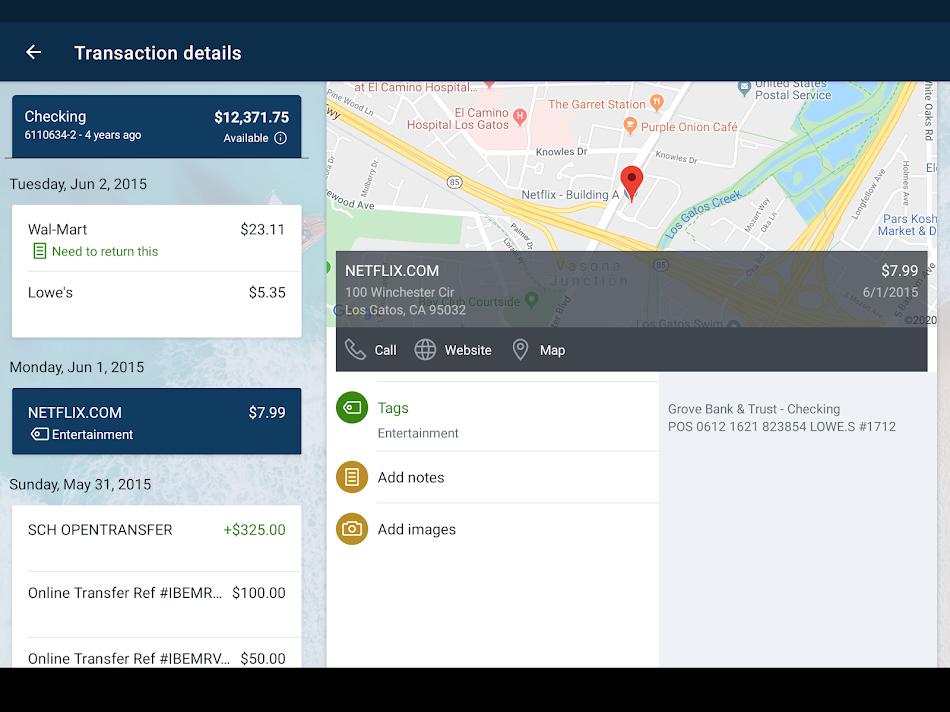
| Transactions | Per-account transactions list, with user-added tags, notes and receipt photos | Posted and pending, with merchant and amount; tags and attachments are user-supplied | Categorisation, reconciliation, expense feeds; receipt images attach as artefacts |
| Statements | "View and save your monthly statements" surface | PDF per month, per account | Document store ingestion; the file is the canonical record for audit work |
| Transfers (internal & external) | Move-money flow between Grove accounts and ACH out | Per-transfer status, amount, scheduled date | Read for state; initiation requires extra consent scope |
| Zelle items | P2P send/receive surface | Per item: counterparty, amount, memo, settle time | Reads cleanly off the same session; useful for cash-flow timelines |
| Mobile deposit | Camera capture of front and back of a check | Per deposit: amount, status, check-image pair | Image bytes fetched lazily; metadata first |
| Card controls | Debit card on/off and reorder | Boolean state, plus event records | Read of state; writing it back is a separate scope decision |
| Balance alerts | User-configured thresholds | Per rule | Useful when migrating a customer's existing alerts to a new product |
Three honest routes
For an app of this shape — community bank, account aggregation already inside, consumer-facing — there are three routes worth describing and one we would actually pick.
1. Aggregator-mediated, account-holder consented
Plaid, MX, Finicity and Yodlee all carry US community-bank coverage of this size. The account holder grants the aggregator scoped access via OAuth-style or credential-handoff flow; we consume normalized balances and transactions from the aggregator. Effort here is low and the legal posture is well-trodden. The trade-off is that data shape, refresh cadence and Zelle visibility vary by aggregator, and not every line item on Grove's app surfaces through them — receipt photos and card-control state, in particular, generally do not.
2. Authorized interface integration against the live session
The customer grants us authorization to capture a real session. We document the bootstrap, the credential post, the device MFA, and the endpoints that return balances, transactions, statements and Zelle items. We then write runnable client code against those endpoints, with a captured contract — request shape, response shape, error codes — so it can be re-run without a person watching. This is the route that pulls everything visible in the app, including tags, notes, receipt images and card-control state. Effort is higher; durability requires a re-validation pass when the bank ships front-end changes.
3. Native portal export
Where the requirement is "give me what's already in PDF or CSV form", the bank's portal carries downloadable statements and, for many accounts, transaction CSV exports. A small driver fronts the portal, pulls the files for the requested date range and lands them in object storage. Modest effort, modest scope.
Where we'd land
For most projects on Grove specifically: route 2 for Grove's own data (transactions with the user tags and attachments are typically what the requester actually wants), and a parallel route 1 only when the external-account legs of the aggregated view need to come along too. Route 3 is a useful supplement for backfill on long histories where the portal exposes more months than the live API call returns in a single page.
A sketch of the live flow
This is illustrative — the exact endpoints, headers, and cookie or token shapes are confirmed during the build by capturing a consenting session. Community-bank front ends in the US share a family resemblance, but Grove's specifics get pinned down on contact, not on this page.
# Illustrative — exact endpoints and headers are pinned to a captured session.
import httpx

DEVICE = {
    "User-Agent": "GroveBankAndTrust/2.x (iOS)",   # version pattern observed live
    "X-Banking-Device-Id": "<assigned at install, persisted by the app>",
}

def login(username, password, get_otp):
    s = httpx.Client(http2=True, headers=DEVICE)
    s.get("https://m.grovebankandtrust.com/bootstrap")            # session + CSRF
    s.post("/auth", json={"u": username, "p": password})          # credential post
    s.post("/auth/mfa", json={"otp": get_otp()})                  # short-lived OTP
    return s

def list_transactions(session, account_id, start, end):
    r = session.get(
        f"/accounts/{account_id}/transactions",
        params={"from": start, "to": end, "limit": 200},
    )
    r.raise_for_status()
    # Items are normalised client-side into:
    # { "id", "posted_at", "amount", "currency": "USD", "memo",
    #   "category", "tags": [...], "attachments": [...] }
    return r.json()["items"]

def fetch_check_images(session, deposit_id):
    front = session.get(f"/deposits/{deposit_id}/front.jpg").content
    back  = session.get(f"/deposits/{deposit_id}/back.jpg").content
    return front, back
Two details matter in practice. Device binding is real on community-bank front ends; a session captured from a never-seen device is treated more cautiously than a session from a device the bank has seen before, and the build accounts for that on first run. And session lifetime is short. The integration assumes a re-login routine, not a long-lived token.
What lands on your drive
For a Grove build the deliverable set is small and concrete.
- Runnable source — Python and Node bindings for the captured endpoints, with the auth, transactions, statements, Zelle and check-image calls wired up.
- An OpenAPI/auth-flow document describing the bootstrap, credential post, MFA step, session shape, and every endpoint we touch — with example request/response payloads from the captured session, with PII redacted.
- Automated tests that hit a recorded fixture for fast CI runs, plus a live-flow check runner that hits a consenting account on a schedule.
- A normalised transaction schema mapping Grove's payload to the shape your downstream consumer wants — typically a flat ledger row with attachments referenced by URL.
- Interface documentation aimed at the engineer who will own it after handoff: where to look when an endpoint shifts, where the device-binding state lives, and how to re-validate.
- Notes on data-retention and compliance posture: what we logged during the build, what we did not retain, and what the consenting account holder consented to in writing.
Things we account for in the Grove build
- Aggregation inside Grove's app is not the same as aggregation in your stack. The home view's "external" accounts come through Grove's own aggregator agreement, which is not a contract you inherit by reading Grove's session. We design the integration so that any external-account leg runs through a Plaid/MX/Finicity-class connection the account holder grants us directly, in parallel with the Grove session.
- Device-binding state lives somewhere — we treat its capture and rotation as part of the build, not as a customer prerequisite, and we walk the access setup with the consenting account holder during onboarding rather than handing them a checklist.
- Receipt-photo and check-image bytes can be heavy. The schema references them by URL and fetches lazily, so a sync over a year of activity does not pull megabytes nobody reads.
- Zelle items behave like transactions on the read side but carry counterparty fields a generic transaction shape will drop. The normalisation mapping keeps those fields, with a flag for downstream code that wants to treat them separately.
- We scope the build around access cycles: the consenting account holder, the sandbox or live account we are working against, and the re-consent window for any aggregator legs in the parallel path — all arranged during onboarding so the engineering side is not waiting on paperwork.
Keeping it from rotting
Community-bank front ends change. Not on a megabank cadence, but they do — a device-binding tweak here, an endpoint rename there, an MFA factor swap when the platform vendor releases a new build. The pay-per-call side of the engagement absorbs that quietly; for source-code delivery we ship a re-validation script and a short runbook for the engineer who picks it up.
Consent, and where the US rulebook actually sits
Two things hold the build up legally. First and primary: the consenting account holder's authorization, in writing, scoped to the surfaces the project needs. That is what makes route 2 (and route 3) clean. Second: where a project also pulls external bank accounts via Plaid/MX/Finicity, the aggregator's own consent flow covers that leg under its existing bank agreements.
The federal angle is the CFPB's Personal Financial Data Rights rule. As finalized, it would have phased in obligations across institutions by size; the rule has since been enjoined in federal court and the agency has issued an Advance Notice of Proposed Rulemaking to reconsider it, per the Federal Register entry of August 2025. The integration does not ride on those assumed obligations as if they were settled — community banks of Grove's size sit at the far end of any phase-in if the rule re-emerges in its prior shape, and it may not. What is dependable today is the account holder's own authorization. We document scope, expiry and revocation per project, minimise what we hold, and run NDAs where appropriate.
App screens, for reference
Captured from the public store listing; useful only for surface orientation.




Adjacent community-bank apps with the same shape
These are not ranked. They are listed because they share Grove's shape — a US community or mid-sized bank with a mobile app that surfaces balances, transactions, transfers and Zelle on top of a digital banking platform. The integration patterns described above transfer across most of them with small adjustments.
- Sunstate Bank Mobile — Coral Gables-based community bank app with the same family of balance, transfer and Zelle surfaces; the integration footprint looks very similar to Grove's.
- Amerant Mobile — larger Florida bank, broader product set; an integrator typically wants the same balance/transaction/transfer ledger here.
- BankUnited Mobile Banking — Miami Lakes-headquartered; a step up in size, but the customer-facing data shape is in the same family.
- City National Bank of Florida Mobile — Miami-headquartered; a peer of Grove on geography, with a broader business banking surface.
- SouthState Mobile — multi-state regional bank app, useful as a comparison point when a client serves customers across the Southeast.
- BankFlorida Mobile — small-bank app; comparable footprint, comparable integration approach.
- Quontic Mobile Banking — digital-first community bank; ratings high, surfaces similar.
Questions integrators ask about this one
Does Grove's internal account-aggregation feature widen what we can reach?
Yes and no. The aggregated view inside the app pulls third-party accounts through the bank's own aggregator stack, but riding that path for downstream use is brittle and not what those aggregator agreements are for. When a project needs the external accounts as well, the cleaner build runs a separate Plaid/MX/Finicity-class connection under the same account holder's consent, in parallel with the Grove session for Grove's own balances. We map that decision per project.
How do remote-deposit check images come through if a customer wants them downstream?
Front-and-back check images are stored against the deposit record and reached through the same authenticated portal endpoints that surface the transaction row. The build pulls the transaction metadata first, then fetches image bytes lazily so a sync over a year of deposits does not pull megabytes the consumer never opens.
Is Zelle a separate authorization or does it ride the same session?
Zelle on Grove's app is session-bound to the same Internet Banking login, so an integration that reads sent and received Zelle items does not need a second consent — it needs the right endpoint and a clear disclosure to the consenting account holder about what is being read.
What happens when Grove ships an app or portal update?
Most updates are cosmetic. Auth-handshake tweaks, device-binding changes, and occasional endpoint rename cycles do happen on community-bank front ends. We keep a small regression suite that hits the live flow on a schedule and roll a patch when something shifts, so the integration does not silently start returning empty pages.
Where these notes came from
Drawn from the app's public store listing, the bank's own digital-banking pages, and primary regulatory documents on the US data-sharing rule. Specifically: the Grove Bank & Trust Mobile Play Store listing; the bank's own digital banking page; the CFPB Personal Financial Data Rights page; and the Federal Register notice on the rule's reconsideration. Endpoint specifics on this page are illustrative; the actual call shapes are captured against a consenting session during the build.
Reviewed 2026-05-20 by the OpenBanking Studio integration desk.
If you want this built and run from your side, source-code delivery starts at $300 — runnable client code, an OpenAPI/auth-flow spec, tests, interface documentation — paid only after we hand it over and you have signed off that it works; or, if you would rather not host anything, call our hosted endpoints and pay per call with no upfront fee. The typical Grove-style build runs on a one-to-two-week cycle. Reach the desk via /contact.html with the app name and what you need.
App profile: Grove Bank & Trust Mobile
Grove Bank & Trust Mobile is the customer-facing mobile app of Grove Bank & Trust, a community bank operating in Miami-Dade County. Per the store listing, the app supports balance and transaction views, internal account aggregation pulling in third-party bank and credit-union accounts for a unified view, transaction tags, notes and receipt photos, balance alerts, internal and external transfers, Zelle send and receive, mobile check deposit by camera capture, monthly statement download, debit card on/off and reorder, and branch and ATM location lookup. Authentication uses a passcode plus biometric on supported devices, on top of the customer's Internet Banking credentials. Android package com.grovebankandtrust.grip per the Play Store listing; iOS App Store ID 1494041896.
Mapping reviewed 2026-05-20.