
A live MetaTrader 5 account keeps its balance, equity, margin, open positions and the full deal history on a broker-operated server — not on MetaQuotes' own systems. The app's listing is explicit about this: MetaQuotes writes the software and states it does not have access to the platform servers and databases managed by financial companies. That single fact decides the whole integration. The data you want is reached through the trader's own connection to a named broker server, addressed by the login, password and server the app uses at sign-in.
So this is a credential-and-consent integration, scoped per broker server, not a vendor data feed. Below: the surfaces an MT5 account exposes, the two authorized ways we reach them, a worked code example against a real surface, and what lands in your repo at the end.
What an MT5 account exposes
These rows map to what the app itself shows under its Trade, History and quote screens. Granularity follows what the terminal returns, not a generalized template.
| Data domain | Where it originates in the app | Granularity | What an integrator does with it |
|---|---|---|---|
| Account summary | Trade tab header — balance, equity, free margin, leverage | One record per account, live | Reconcile funding, monitor margin health, feed a dashboard |
| Open positions | Trade tab — volume, entry, SL/TP, floating P&L | Per position, real-time | Live exposure and risk monitoring across accounts |
| Pending orders | Trade tab — limit and stop orders awaiting fill | Per order | Mirror the working order book into your own system |
| Deal & order history | History tab — closed deals, fills, commissions, swaps | Per deal, time-ranged | P&L reporting, audit trails, tax-season export |
| Quotes & charts | Quotes / chart screens — Level II up to 32 quotes | Tick and OHLC, M1 through MN | Backtest feeds, price archives, signal generation |
| Symbol metadata | Instrument specs — contract size, digits, trade modes | Per symbol | Correct rounding and lot maths in downstream code |
Two authorized ways in
Which one we use depends on whether you are integrating one consenting trader's account or a brokerage's whole book.
Route A — user-consented access to the trader's own account
The trader already authenticates to their broker server with login, password and server name inside the app. With that same consent, the terminal-backed interface (the MetaTrader5 module driving a running terminal) returns account summary, positions, orders and the deal-history calls the History tab is built on. Reachable: nearly everything a single account can see. Effort: low to moderate — the call surface is stable and well documented at MQL5. Durability: high, because it tracks the published terminal interface rather than a private mobile endpoint. We set up the consenting account, the terminal host and the credential handling with you during onboarding.
Route B — broker-side Manager and Web API, under the broker's authorization
For a brokerage that wants its own back office to read across many accounts, the server ships Manager and Web API surfaces for account, trade and reporting operations. Reachable: bulk account state, balance operations and compliance reporting across the book. Effort: higher, and gated on the broker's own authorization, which we arrange together. Durability: high — these are first-class server interfaces. Where neither path is wanted, the app's own statement export covers a closed deal set as a fallback, though it is coarser than the live calls.
For most requests we land on Route A and build the read layer around the consenting account, because the data a single trader or a small fund actually needs — their balance, positions and deal history — is fully reachable that way without involving the brokerage. Route B is the right call only when the scope is the whole book, and we say so up front when it is.
A worked read against the deal history
Illustrative, in the shape we confirm during the build. It signs in to the broker server, reads the account summary, then pulls the closed-deal history for a date range — the same records the History tab renders.
import MetaTrader5 as mt5
from datetime import datetime

# Consented credentials for ONE broker server, supplied by the account holder
if not mt5.initialize(login=ACCOUNT, password=PWD, server="YourBroker-Live"):
    raise SystemExit(f"connect failed: {mt5.last_error()}")

acct = mt5.account_info()._asdict()
# -> {'login':..., 'balance': 10250.40, 'equity': 10180.12,
#     'margin_free': 9800.0, 'leverage': 100, 'currency': 'USD', ...}

deals = mt5.history_deals_get(datetime(2026,1,1), datetime(2026,6,17))
rows = [{
    "ticket": d.ticket, "symbol": d.symbol, "type": d.type,
    "volume": d.volume, "price": d.price,
    "profit": d.profit, "commission": d.commission, "swap": d.swap,
    "time": datetime.utcfromtimestamp(d.time).isoformat() + "Z",
} for d in (deals or [])]

mt5.shutdown()
# rows -> normalized JSON, ready for reconciliation / CSV / tax export
Error handling, reconnect-on-drop and paging long histories by month are part of the delivered code, not left as an exercise.
What lands in your repo
Each deliverable is tied to the surfaces above, not a stock checklist.
- An OpenAPI/Swagger spec for a clean read service over account summary, positions, orders, deal history and quotes — normalized field names and currencies.
- A protocol & auth-flow report: how the login/password/server handshake works, session lifetime, reconnect behaviour and the terminal-host dependency for Route A.
- Runnable source (Python first, Node.js on request) for the key reads — account, positions,
history_deals_getpaging, and a tick/OHLC puller across the M1–MN timeframes. - Automated tests against a demo account — the app offers free demo accounts, which gives us a safe fixture for history and quote calls.
- Interface documentation: field-by-field meaning of deal types, commission vs swap vs profit, and symbol-spec rounding.
- Data-retention and consent-record guidance covering how credentials and pulled records are stored and minimized.
Consent and the data-protection footing
The dependable basis here is the account holder's own authorization: their credentials, their consent, their data. There is no single market regulator for MT5 the way there is for a domestic bank, because the broker on the other end could be licensed anywhere and MetaQuotes is only the software vendor. Where the trader or broker sits in the EU, GDPR governs the personal and financial records we touch; elsewhere the local data-protection regime applies. We scope consent to the specific calls in play, honour revocation by dropping stored credentials and derived data, log every access, and work under an NDA where the engagement needs one. Account credentials are treated as secrets in transit and at rest, and we keep the pulled record set to what the stated purpose needs.
Things we handle in the build
Two MT5-specific realities that shape how we engineer the integration:
- Per-broker server differences. Symbol names, suffixes, contract sizes and trade-execution modes vary between broker servers running the same MT5 software. We map these per server so a deal on "EURUSD.m" at one broker reconciles correctly against "EURUSD" at another, rather than assuming one global symbol table.
- The terminal-host dependency on Route A. The Python read layer talks to a running terminal logged into the account, so we design the integration around a hosted, supervised terminal with reconnect handling, and build the sync to survive the periodic session drops a broker server issues — instead of assuming an always-open socket.
- History paging and timezones. Server time is usually not UTC and long histories return large result sets, so we page
history_deals_getby month and normalize every timestamp to UTC on the way out, which keeps tax and P&L reports stable.
Access to a consenting account or a broker sandbox is arranged with you as part of onboarding; the build runs against the free demo server first, then your live target.
Where teams put this to work
- A small fund pulling nightly deal history off several broker accounts into one P&L and risk view.
- An accountant exporting a trader's closed deals, commissions and swaps for a tax year as clean CSV.
- A signals product mirroring open positions and pending orders into its own dashboard in near real time.
- A quant archiving tick and M1 data across instruments for backtesting against the broker's own price series.
Pricing and how delivery runs
Most MT5 jobs start as a fixed read service over one broker server, and the price reflects that scope. Source-code delivery starts at $300: you get the runnable source, the spec, tests and docs, and you pay after delivery once the integration works against your account. If you would rather not host anything, the pay-per-call hosted API is the other model — you call our endpoints for account, positions and deal-history reads and pay only for the calls, with no upfront fee. Either way the cycle is one to two weeks. Tell us the app and what you need from its data and we scope it back to you — start the conversation here.
How this was checked
Reviewed June 2026 against the app's Play Store description, the published MQL5 Python integration docs for the account and history calls, and brokerage-side write-ups of the MT5 Manager and Web API surfaces. Sources opened:
- MQL5 docs — history_deals_get (Python integration)
- MetaTrader 5 for brokers and banks (MetaQuotes)
- B2Broker — Web API for MetaTrader, how it works
- Google Play listing — MetaTrader 5
OpenBanking Studio · integration desk mapping, June 2026.
Comparable platforms in the same space
Named for context and keyword reach — a unified integration usually has to span more than one of these, since traders rarely live on a single platform.
- MetaTrader 4 — the older MetaQuotes terminal; similar broker-server model, forex-centric, still widely connected.
- cTrader — ECN-focused forex and CFD platform with its own account and order data behind broker connections.
- TradingView — charting and broker-linked trading; holds watchlists, alerts and linked-broker positions.
- NinjaTrader — futures and forex platform with its own account, order and historical-data stores.
- Plus500 — CFD app holding per-user positions, orders and statement history.
- eToro — multi-asset and social trading; portfolio, position and copy-trade records per account.
- IG Trading — forex, shares and CFDs with account statements and a documented trading interface.
- Exness Trader — broker app exposing account balance, positions and deal history to its clients.
- Thinkorswim — equities and options platform with account, order and history data behind login.
Questions integrators ask
Where does an MT5 account's data actually live?
On the broker's server, not on MetaQuotes infrastructure. As the app's own listing states, MetaQuotes makes the software and does not hold the account databases — those run on the server component each financial company installs. So an integration is scoped per broker server, addressed by the login, password and named server the trader uses to sign in.
Can the deal history and balance be pulled programmatically?
Yes. With the trader's consent we read account summary (balance, equity, margin, leverage), open positions, pending orders and the time-ranged deal history that the mobile app shows under Trade and History, then normalize it into JSON or CSV for reconciliation, reporting or tax export.
Does this need cooperation from the broker, or only the trader?
Both paths exist. A consenting trader's own credentials are enough to read their account through the terminal-backed interface. For broker-wide access across many accounts, we work against the broker-side Manager and Web API under the broker's authorization. We confirm which path fits during onboarding and arrange the access with you.
Which symbols and timeframes can the market-data side cover?
Whatever the connected broker lists — forex pairs, stocks, CFDs and futures — at the nine timeframes the app exposes, M1 through MN, as bars or ticks. We pull historical rates for backtests and live ticks for monitoring, scoped to the instruments your account can see.
Interface evidence

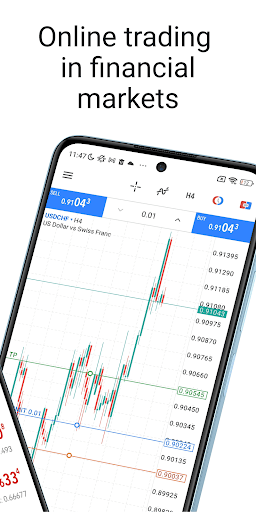


App profile — MetaTrader 5 — Forex, Stocks
MetaTrader 5 is the multi-asset trading terminal from MetaQuotes for Android and iOS, used by traders to connect to hundreds of forex and stock brokers. It carries real-time quotes, financial news, charting with 30-plus indicators and 24 analytical objects, nine timeframes (M1, M5, M15, M30, H1, H4, D1, W1, MN), and the full order set including pending orders and Level II prices up to 32 quotes. To trade with real money a user opens an account with a broker that runs the MT5 server component; free demo accounts are available. MetaQuotes states it is a software company that does not provide financial services and does not have access to the platform servers and databases the financial companies manage. The app carries a risk warning that most retail investor accounts lose money trading these products. Package ID net.metaquotes.metatrader5, per its Play Store listing.